|
Creating Origination Fees in the Loan Control Report |
|
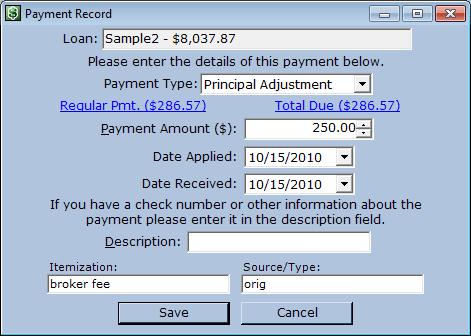
Origination fees in the Loan Control Report are simply principal addition records — a form of payment record — with a special setting in one of the custom fields. Select a loan, then from the Main Menu. Assuming you used the settings from the User's Guide when enabling the Loan Control Report, your payment dialog will look like the one pictured.
Make sure the Payment Type is “Principal Adjustment,” and the amount is correct. Set the Date Applied to some time before the first payment is due. Set the Date Received to match the Date Applied. Setting the “Source/Type” field to “orig” tells the Loan Control Report that this record should be tallied in the Origination Fees section of the report, not the Subsequent Advances section, where principal adjustments with positive amounts are totaled by default. If you have more than one type of Origination fee applied to a loan, such as “credit verification” and “broker fee”, put those values in the Itemization field of the principal adjustment. On the Control Report, Origination fees are grouped by the value in the itemization field, totaled, and listed on separate lines. |